Apply stash vs Pop stash in GitKraken - what’s the difference?
If you’ve been working with Git for a while, chances are you’ve used stash at some point.
Maybe you needed to:
-
Quickly switch branches
-
Pull the latest changes
-
Start working on something else
Or just get your messy work-in-progress out of the way.
Stashing lets you temporarily save your changes without committing them. But once you’re ready to bring those changes back, GitKraken gives you two options: ‘Apply stash’ and ‘Pop stash’.
So… what’s the difference? Let us sort it out.
Step 1
Make some changes in your repository, any kind. You now have modified files in your working directory that are not yet committed.
Step 2
Click the Stash changes button in GitKraken. Your changes are now safely stored in the stash list and your working directory is clean again.
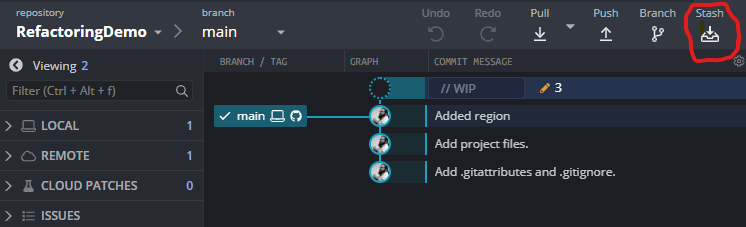
Step 3
Right-click your stash and you’ll see two different options:
- Apply stash
- Pop stash
- (And Delete stash, but that’s not applicable for our purposes)
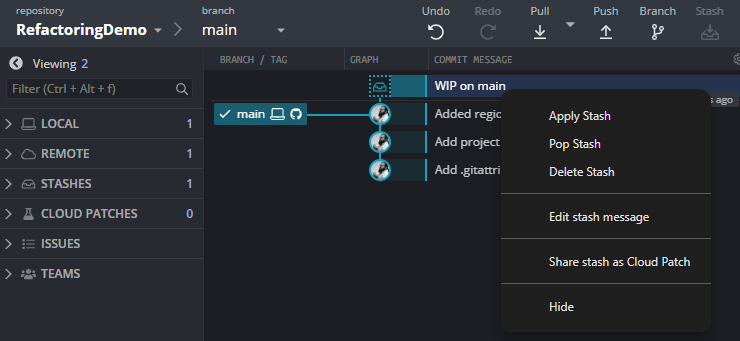
Both of these will restore your previously stashed changes back into your working directory.
But here’s the key difference:
Apply stash
When you choose Apply stash, GitKraken will:
- Restore the stashed changes
- Keep the stash saved in the stash list
This means you can apply the same stash again later if needed. This is useful when you:
- Want to reuse the same changes on multiple branches
- Are unsure if you’ll need the stash again
- Want a backup just in case something goes wrong
Think of this as a copy & paste.
Pop stash
When you choose Pop stash, GitKraken will:
- Restore the stashed changes
- Remove the stash from the stash list
So once it’s applied it’s gone.
This is useful when you:
- Are done with the stash
- Don’t need the changes again
Think of this as a cut & paste.
And now you know the differences between apply stash and pop stash!
GitKraken Desktop is free and available for Windows, MacOS and Linux! Click here to download GitKraken Desktop.